Get your time back. Make focus inevitable.

MonkMode blocks the apps that break focus, catches automatic opens in real time, and shows how much time the system gives back.

Hard Blocking System-level controls instead of reminders.
Open Limits Control opens/day, not only minutes.
Challenge Alarms Dismiss via math/typing with wake checks.
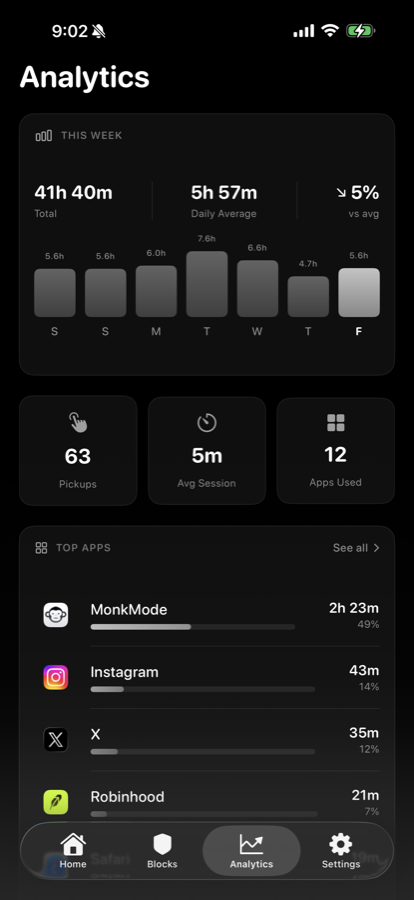
Real Analytics DeviceActivity and Screen Time trend analysis.
Live Scroll Demo

Apps fly in. MonkMode blocks them in real time.

Scroll this section: the apps rush the phone, then the block engine shuts them down.

Step 1

Distraction apps try to hijack focus

Social apps rush in first. That is where most focus systems fail.

Instagram TikTok X Facebook Short Video Instagram TikTok X Facebook Short Video
Why Most People Stay Stuck

Distraction is not a motivation problem. It is an enforcement problem.

If your current tools rely on reminders alone, your behavior will collapse during low-discipline moments.

Automatic Loop

The relapse starts before the thought finishes.

The thumb moves first. The brain explains it later. MonkMode has to interrupt before the app earns a clean opening.

  • Autopilot tapThe user reaches for the app before deciding to.
  • Hard shieldThe opening is blocked instead of politely warned.
  • Logged patternThe risky app, time, and attempt feed the recovery view.
Typical Focus App Loop

  • Set timer
  • Receive reminder
  • Ignore reminder
  • Open app anyway
  • Lose momentum

MonkMode Enforcement Loop

  • Set hard block rules
  • Attempt gets intercepted by shield
  • Friction/challenge interrupts autopilot
  • Attempt is logged in analytics
  • Scores, streaks, and settings adapt
Proof Layer

After the block fires, the system keeps moving.

The post-block loop should be simple: catch the attempt, enforce the rule, log the pattern, and return the user to focus.

  1. 01 Tap caught

    The app never gets a clean opening.

  2. 02 Shield shown

    Friction interrupts the automatic path.

  3. 03 Pattern saved

    The risky time window becomes visible.

  4. 04 Time returns

    The user gets back to the intended task.

Platform Breakdown

Feature depth across blocking, analytics, alarms, and recovery

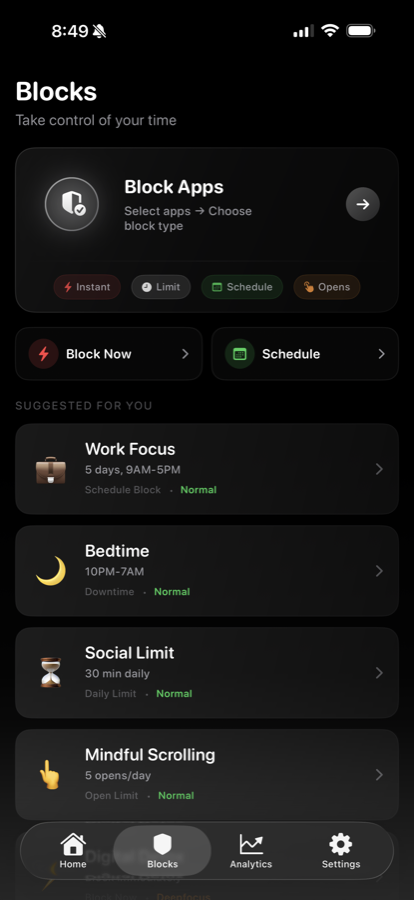
Block Engine + Difficulty Paths

Immediate blocks, recurring schedules, downtime windows, daily limits, and open limits. Strictness modes route unlock attempts through harder intervention paths when needed.

  • Scheduled and recurring block windows
  • Open limits with cooldown/reset logic
  • Temporary access grants with re-shielding
FamilyControls ManagedSettings Shield Actions
MonkMode blocks screen
MonkMode analytics screen

Analytics + Recovery Scoring

Real DeviceActivity and Screen Time metrics power weekly trends, pickups, app/category analysis, and a composite recovery model that updates from daily behavior.

  • Top apps and category-level insights
  • Pickups and switching-pattern visibility
  • Brain-health style score progression
DeviceActivity ActivityReport Scoring Engine

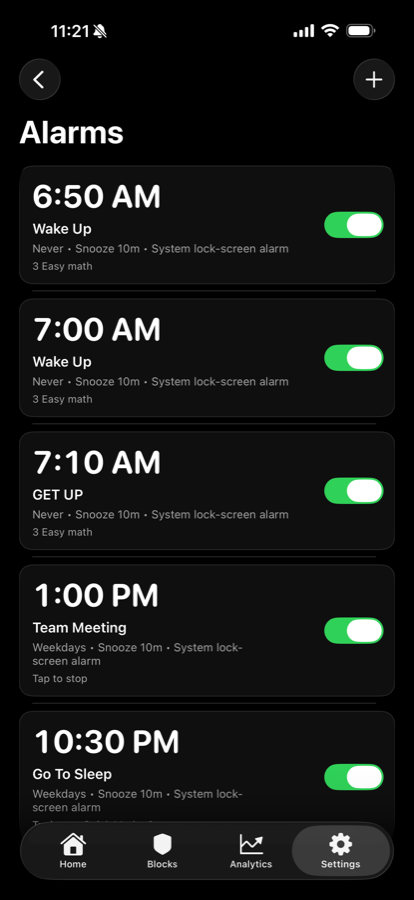
Challenge Alarms + Wellness Layer

Difficulty-based alarms require actions to dismiss, with wake checks and follow-up protections. Sleep settings and HealthKit sync inform wake metrics and behavior scoring.

  • Math and typing challenge-to-dismiss flows
  • Snooze limits and mission-stage logic
  • Sleep schedule integration and wake checks
AlarmKit path HealthKit UserNotifications
MonkMode alarm screen
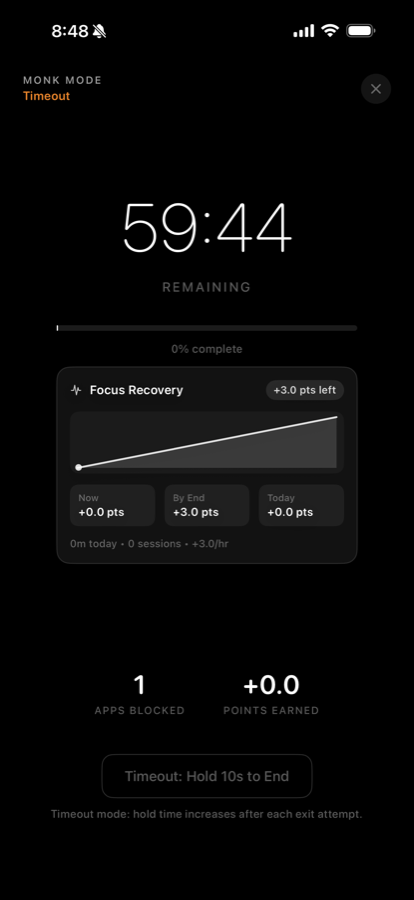
MonkMode focus session screen

Monk Mode Sessions + Gamification

Deep-focus contracts with defined duration, strictness, blocked-attempt tracking, and completion events. Session quality impacts XP, levels, streaks, and achievement unlocks.

  • Defined focus contracts
  • Blocked-attempt event tracking
  • Quality-aware reward and penalty system
Contracts XP + Levels Streaks
Scroll Zoom

The recovery graph opens up as the week compounds.

Keep scrolling here: the page expands, the graph pushes closer, and the recovered-hours curve fills in instead of another card sliding around.

MonkMode recovered-hours graph zoom A scroll-driven graph showing recovered focus time increasing across a week. MONKMODE ANALYTICS 21h recovered Blocked loops converted into protected focus time Loops blocked +3h/day reclaimed Mon Wed Fri Sun
  1. 3hrecovered today
  2. 21hprojected weekly gain
  3. 1,095hyearly focus returned
See Home Preview
Use Cases

Different ways to run MonkMode during the week

Weekdays · 9 AM - 5 PM

Work Block

Suppress social feeds and low-value apps during deep work windows.

Every Day · 10 PM - 8 AM

Sleep Protection

Shut down late-night scroll loops and protect sleep consistency.

One-Off · 90 Minutes

Deadline Sprint

Run a strict one-off session with no-override unlock path.

Daily · Open Limit 5

Social Cap

Allow only a fixed number of opens per day for high-trigger apps.

Weekends · 5 PM - 8 PM

Family Time

Force device boundaries during dinners and uninterrupted time.

Mon-Fri · 6 AM - 8 AM

Morning Routine

Start the day with intentional focus before social or entertainment apps.

"MonkMode is built for people who are done negotiating with distractions. Real enforcement, adaptive friction, and measurable recovery data create a system you can actually rely on."

MonkMode Product Direction
Access

Start free. Keep MonkMode for less than $3/month.

Try the full blocker, open limits, recovery analytics, and challenge alarms for 3 days before the monthly subscription starts.

Daily target 3h back
Weekly recovery 21h
Core engine Hard blocks
FAQ

Common questions

Is MonkMode just a timer app?

No. It is a full focus-enforcement platform with hard blocking, unlock friction, analytics, recovery scoring, and challenge alarms.

Can MonkMode block apps instead of only warning me?

Yes. The product is built around enforced app restrictions, open limits, schedules, and friction before access.

Can I start with lighter rules?

Yes. Start with open limits or scheduled blocks, then increase friction once you know your highest-risk windows.

What happens after I start?

You start the 3-day trial, connect the same account in the app, and set your first hard block from the iOS app flow.

Start Now

Block the loop. Get your time back.

MonkMode gives you hard iOS blocking, real recovery data, and friction that fires before another scroll loop starts.

Feedback